Voice question and UI question are out of sync
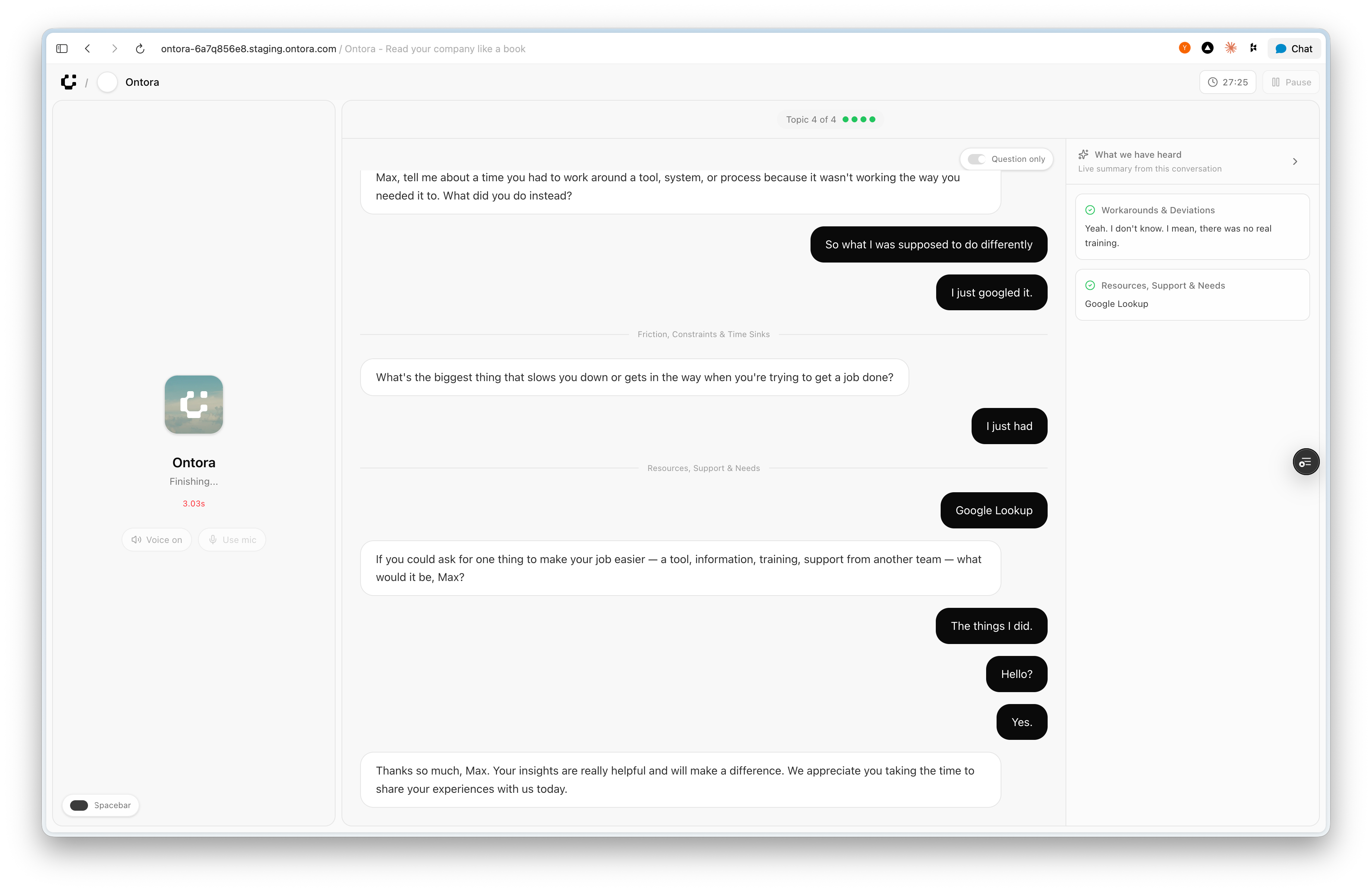
In the interview player / live interview screen, the questions spoken by the agent are not in sync with the questions shown in the UI. The user hears one question but sees a different one on screen. I expected the on‑screen question to always match exactly what the agent is currently asking.
Steps to Reproduce
Go to an active interview session in the Ontora app.
Start or resume playback of the voice agent (or start a new live interview).
Listen to the agent’s spoken question while watching the question text shown on the screen.
Notice that the displayed question does not match the one being spoken.
Actual vs Expected Behavior
Actual: The agent is asking Question A, but the UI already shows Question B (or some other question), causing audio and text to be out of sync.
Expected: The UI should always show the exact question the agent is currently asking, updating only when the spoken question changes.
Additional Context (optional)
Happens on the main interview flow, Topic 4/4 in the current example, but likely general to all topics.
Status: Completed
Log in to comment and vote
No comments yet
Be the first to share your thoughts.